Version 13 Release and Installation Notices
Version 13 is a supported version of LANSA. Service Pack 2 (SP2) is the latest service pack for V13.
See the new feature highlights in V13
Re-licensing all LANSA software
- EPC133400 for V13 SP2 replaces sentinel development licenses with LANSA development licenses. Contact your local LANSA license representative to obtain a replacement V13 development license before applying EPC133400.
- When upgrading to V13 (even if your ‘upgrade’ is in fact the installing of a new version), you will be required to obtain new V13 specific licenses for all LANSA software that required licensing at V12 and prior. Both server and client licenses are included in the re-licensing.
- New licenses can be obtained in advance in preparation for a V13 upgrade.
- Prior to upgading to V13, you should send the CPU details of all servers and workstations requiring re-licensing to your LANSA representative for new V13 licenses. Refer to Product Licensing for more details.
Important Notice: From October 2018, LANSA will no longer be offering a hardware key (also known as a dongle) option for development licensing for any version of Visual LANSA. New Hardware key licensing requests and hardware key upgrade requests will instead be redirected to the softkey development licensing options. These include the softkey option for use on a single physical CPU (VLW key) and the License Server option for multiple developers, servers and virtual environments (VLN key). The information in this notice overrides any other existing hardware key information on the LANSA Licensing pages.
Very important step to perform BEFORE upgrading to V13
You MUST check in all objects to the Master IBM i Repository prior to upgrading to Version 13. Failure to do this will set all local objects to not checked out.
Upgrading to V13 will set all objects to NOT CHECKED OUT in the Visual LANSA database. This
requirement is to support the enhancement to allow an object to be checked out for update to only
one PC at a time. Refer to the V13 Readme CCS# 107481 on the V13 DVD for further details of the
enhancement.
V13 Quicklinks
- Important notices you should read before installing V13 or upgrading to V13
- Latest Version documentation
- Version 13 support information, including the Version 13 Supported Platforms document
- V13 requires new Licenses/License Consolidation
- SQL Server upgrade and install considerations
- How to download LANSA V13 image and add to an image catalogue
- Windows 8 and Windows 2012 support in LANSA
- V13 Install Planner
Latest available EPCs
The latest LANSA EPCs that contain fixes and add valuable new features to your LANSA products can be found in the EPCs section of this site.
Release Notices
| Date | Product | Version | Description | |
|---|---|---|---|---|
| 23 October 2018 | LANSA Integrator LANSA Composer |
V13 SP2 |
Category: Java compliance |
|
| 9 Dec 2017 | LANSA Composer | All supported versions |
Category: Mapforce Licensing |
|
| 3 Nov 2017 | LANSA Composer | All supported versions |
Category: Mapforce 2018 |
|
| 25 Oct 2017 | LANSA Client | All versions |
Category: Windows Updates
|
|
| 26 Jul 2017 | LANSA for iSeries LANSA Composer |
V13 |
Category: Upgrade |
|
| 18 Nov 2016 | Longrange for RPG/LANSA | All |
Category: Longrange Original Post: Apple has announced that starting from January 2017, all
apps (including LongRange) on the App Store are to use HTTPS (TLS) connection only.
Refer to this Longrange forum notice for details |
|
| 7 Nov 2016 | LANSA for i | V13 SP2 |
Category: Host Monitor/Checkin and Compile |
|
| 22 Aug 2016 | LANSA for the Web | V13 SP2 | Category: WAM Execution The following character set issue, exclusive to IBM i 7.3 operating systems, is caused by an API change in IBM i 7.3. On IBM i 7.3, in a WAM, a text LOB in CCSID 37 is sent as corrupted characters (not transcoded) when using the Internet Explorer browser. Note: In Chrome or Firefox users may experience symptoms of LANSAWEB object being downloaded. The cause of this issue is from changes made in 7.3 to an IBM i’s get attributes API causing failures to retrieve file information (CCSID, timestamps and other properties). There are separate patches available for all LANSA versions supported on 7.3. Please contact your local support team to obtain the appropriate fix for the version of LANSA you are encountering the issue with. Important: You should only request this fix if you are encountering the issue described and only if you are on IBM i 7.3 operating system. |
|
| 17 Aug 2016 | LANSA Integrator & LANSA Composer |
V13 & V5.0 |
Category: Upgrade Upgrading LANSA Integrator from V13 SP1 to V13 SP2 clears the data area JSMDRTDTA [JSM Direct Configuration] in the <JSMLIB>. As a result, any JSMDirect request will fail. Note: This issue also manifests itself when upgrading LANSA Composer from Version 5 to Version 6. The JSMDRTDTA data area should contain <PGMLIB> from position 1-10 and <COMLIB> from position 11-20. The workaround is to reinstate these values. Contact LANSA support if you need assistance making these changes. |
|
| 17 May 2016 | LANSA Composer | V6.0 | Category: Upgrade LANSA Composer Upgrade on IBM i may restore IFS content to the wrong location if the LANSA Composer system setting Default trading partner linked directory no longer corresponds exactly to the location of the root IFS directory for LANSA Composer content. Refer to LANSA Composer Upgrade on IBM i may restore IFS content to the wrong location for details. |
|
| 12 May 2016 | LANSA Composer | V6.0 | Category: Mapforce MapForce 2016R2 and Mapforce 2016R2SP1 has introduced an ODBC Connection issue that can affect existing maps. Refer to MapForce 2016R2 ODBC Connection issue for details. |
|
| 22 Mar 2016 | LANSA Composer | V6.0 | Category: Install If LANSA Composer client or server is installed with the option “Install for all user of the machine” but in a non-default location that does not include the words ‘Program Files' in its path, the desktop shortcut to the program icons will not be correct. In this case, you need to manually edit the properties of the desktop icon and change the target path to one like this (adjusted as necessary for your system): "C:\ProgramData\Microsoft\Windows\Start Menu\Programs\LANSA\LANSA Composer 6 Client" |
|
| 27 Aug 2015 | Visual LANSA and LANSA for iSeries | V13 SP2 EPC132900 |
Category: Printing After applying EPC132900 to V13 SP2, you may experience the following error printing in RDMLX 9999 Message: (0149) - Error detected when attempting to copy temporary print file to printer port. Printer port specified/defaulted in PRTR= parameter may not be valid or is not usable at this time. Rountine: x_Close_report This error can occur in both Visual LANSA and LANSA for iSeries. A hotfix is available from LANSA to resolve this issue. Contact your local support team to obtain the fix. |
|
| 18 Aug 2015 | Visual LANSA | V13 | Category: WAMs Clicking on the Design tab in the WAM editor can generate the following error. 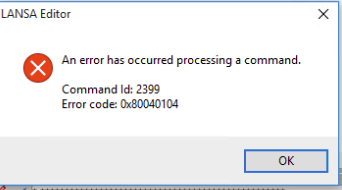 A hotfix is available from LANSA to resolve this issue. If you experience problems with opening the design view of the WAM editor in Visual LANSA after upgrading to Windows 10, please contact your local support team to obtain the fix. |
|
| 11 Aug 2015 | Visual LANSA | V13 | Category: Upgrade In some situations, taking the option of the free upgrade to Windows 10 (from applicable versions of Windows 7 or Windows 8.1), can cause a failure in Visual LANSA. The error generated is Global data initialisation failed 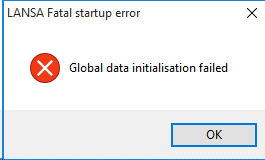 A utility is available from LANSA to allow Visual LANSA to be used with Windows 10. If you experience problems with Visual LANSA after upgrading to Windows 10, please contact your local support team to obtain the fix. |
|
| 14 Jul 2015 | LANSA for iSeries | All Versions | Category: Performance LANSA customers have reported significant LANSA performance issues after applying the latest CUME PTF to IBM i 7.2. A PTF is available from IBM to correct this problem. Refer to Latest CUME PTF for IBM i 7.2 introduces significant LANSA performance issues |
|
| 13 Apr 2015 | LANSA Composer | V5.0 | Category: Install The LANSA Composer 5.0 installation guide states the following: The LANSA Composer installation on IBM i servers now supports installation into independent auxiliary storage pools (IASP), if required. This statement is not correct; the LANSA Composer 5.0 install does not support installing directly into independent auxiliary storage pools (IASP). Manual steps are available from your local LANSA support group if an IASP LANSA Composer installation is required. |
|
| 28 Jan 2015 | LANSA Composer | V5.0 | Category: Performance A LANSA Composer 5.0 hotfix is available to fix an issue that can cause performance issues in V5.0 on a Windows server. Some LANSA Composer database indices were not created in a LANSA Composer version 5.0 Windows server installation. This leads to poor responsiveness in parts of the LANSA Composer application, and in particular, the database housekeeping (especially the log purge) can take longer than expected to complete. Please ask your LANSA Composer supplier for Hotfix 004 for LANSA Composer version 5.0. |
|
| 27 Jan 2015 | LANSA for the Web | V13 SP2 | Category: Web Execution After upgrading to V13 SP2, loss of browselist data when the LANSA Web job reaches HTML timeout and the LANSA Web Job is no longer active can occur in webevent applications executing on the IBM i data application server. Technically speaking, when HTML timeout is reached, browselist data is transferred for reuse. In V13 SP2, this transfer is not occurring. Under the situation where the Web Job is no longer running (for example, transaction monitor cleanup due to system setting of reuse 1), the new Web job is not able to retrieve the browelist data from the previous Web job. Users under this situation will encounter loss or corruption of browselist data. Update: A fix for this issue is available in EPC132900 for V13 SP2. Refer to the LANSA for the Web EPCs page for details. |
|
| 24 Sep 2014 | LANSA for iSeries | V13 SP2 | Category: Web Execution After upgrading to IBM i 7.2 or installing LANSA V13 SP2 on IBM i 7.2, LANSA for the web/WAMs will not execute correctly with CGIConvMode Binary set. This problem is introduced in 7.2. A PTF is available from IBM to correct the issue. You should download and apply PTF SI54023 for 7.2. Reminder: In V13 and above, CGIConvMode BINARY is a mandatory setting in the HTTP Server Configuration for LANSAWEB CGI. Refer to CGIConvMode BINARY setting required for LANSAWEB CGI for a full description on how to set this correctly. |
|
| 24 Sep 2014 | LANSA Composer | V5.0 | Category: Mapforce 2015 Altova MapForce versions 2015 has been tested with LANSA Composer version 5.0. A hotfix for LANSA Composer version 5.0 will be required in order to prepare maps (existing or new) with MapForce 2015 installed. Please ask your LANSA Composer supplier for Hotfix 003 for LANSA Composer version 5.0. |
|
| 24 Sep 2014 | LANSA Composer | V4.0 | Category: Mapforce 2015 MapForce 2015 is unsupported with LANSA Composer version 4. LANSA Composer version 4 users should not upgrade to MapForce 2015 unless they first upgrade to LANSA Composer version 5. |
|
| 1 Sep 2014 | Visual LANSA | V13 SP2 | Category: Superserver After upgrading to V13 SP2, deleting a record in a file when executing in superserver mode, causes the application to fail unexpectedly with the following error. PRR0083: Fatal error when attempting to convert <Field name > from client to server or server to client format.There a hotfix available at SP2 level to resolve this issue. This hotfix can be requested from your local LANSA support group. Note: All client side functions/forms that call the OAM in superserver mode need to be recompiled after applying this hotfix. |
|
| 29 Aug 2014 | LANSA for the Web | V13 SP2 | Category: Web Execution V13 and above, CGIConvMode BINARY is a mandatory setting in the HTTP Server Configuration for LANSAWEB CGI. After upgrading to V13 SP2, ensure that your HTTP Server configuration has CGIConvMode BINARY set for the LANSAWEB CGI. The upgrade process will not manipulate your existing apache configuration to include this setting. Failure to do will lead to unexpected web execution behaviour. Refer to CGIConvMode BINARY setting required for LANSAWEB CGI for a full description on how to set this correctly. |
|
| 24 Jul 2014 | LANSA Open for .NET & Visual LANSA |
V13 SP2 | Category: Compatibility Using LANSA Open for .NET V3.6 to connect to LANSA V13 will generate an exception after upgrading the server to SP2. The error on connection is "Unexpected record received" This connection error is introduced because of superserver changes in V13 SP2 that also affect LANSA Open for .NET. The solution is to download and install LANSA Open for .NET V3.7 from the LANSA web site. |
|
| 15 July 2014 | LANSA for the Web | V13 SP2 | Category: Web Execution After installing V13 SP2 or upgrading to V13 SP2, some pages may display a blank page without any messages. This is due to the use of deprecated Content-Types when posting during web execution. In V13 SP2, LANSA has enforced the use of specific valid Content-Types. You have two options to get past this situation. Refer to Valid HTML Content-Type to use when POSTing during web execution for a full description of the issue. |
|
| 4 Jul 2014 | Visual LANSA | V13 SP2 | Category: Deployment After installing V13 SP2 or upgrading to V13 SP2, even though you elected to not enable 64-bit mode during the install, you may still encounter failures when building deployment packages indicating 64-bit DLLs cannot be copied. To get past this situation, you should delete the X_WIN64 folder from the LANSA Root directory. For example, if your LANSA folder is C:\program files\lansa\x_win64, you can delete the x_win64 folder. Note: If you elected to enable 64-bit mode during the LANSA install, you should not delete the X_WIN64 folder. |
|
| 27 Jun 2014 | LANSA Integrator | V13 SP2 | Category: Install With V13 SP2, it is now mandatory to have 64-bit of JAVA on a 64-bit PC in order to use LANSA Integrator. There are implications for the V13 SP2 install and upgrade. Refer to You must have 64-bit JAVA to run JSM on a 64-bit PC. |
|
| 23 Jun 2014 | LANSA Integrator | V13 SP2 | Category: JSMProxy & JSMDirect After installing V13 SP2, you can encounter issues in LANSA Integrator Studio when creating services for JSMDirect and JSMProxy. This is caused by missing files after installing V13 SP2 LANSA Integrator. Refer to Missing LANSA Integrator files in V13 SP2 for details and the solution. |
|
| 13 Jun 2014 | Visual LANSA | V13 SP2 | Category: Deployment When using the MIS deployment model in V13 SP2, uninstalling a Patch, in a specific circumstance, will not restore the data in the table to the expected contents. Refer to Depending on options selected when deploying file changes via patch, the data may not be restored after uninstalling the patch. |
|
| 13 Jun 2014 | Visual LANSA & LANSA for iSeries |
V13 SP2 and above | Category: Export/Import Backwards Compatibility Note: Prior to LANSA V13 SP2 when exporting, frameworks and groups were only exported if at least one VL component was exported and "Omit Frameworks and Groups" was NO. Now they are exported purely according to the value specified for "Omit Frameworks and Groups". Refer to Exporting and Importing in the V13 SP2 iSeries User Guide. |
|
| 26 May 2014 | Visual LANSA & Visual LANSA Frameworks |
All versions | Category: ActiveX usage A recent update (11.0.7) of Adobe Reader introduces problems when using the Adobe ActiveX reader in LANSA applications. LANSA is aware of the issue and is investigating how we can assist LANSA users to overcome this incompatibility. Refer to the following Technical Note for details and possible workarounds. Latest update to Adobe Reader causes ActiveX errors in LANSA applications. |
|
| 23 May 2014 | LANSA for the Web | V13 SP1 EPC131100 | Category: Web execution After upgrading to V13 SP1, you may experiece either corruption or incorrect translation of special characters in non-english LANSA systems. A patch can be requested from your local LANSA support group to correct this issue. Refer to Incorrect translation of special characters in LANSA for the Web applications in V13 SP1 for full details. |
|
| 12 May 2014 | LANSA Composer | V5.0 | Category: Install & Initialization LANSA Composer 5.0 cannot be installed on iOS V5R4. Please note that V5R4 is no longer supported by IBM. Attempting to install LANSA Composer 5.0 on V5R4 will generate many instances of the following message during the Initialization Transformation map implementation file not imported for IORDERS_XXXX The associated messages in the joblog on the IBM i state: CPD0043 Keyword AUT not valid for this command. A keyword was specified on a command that has no corresponding parameter. CPF0001 Error found on CPY command. The same import problem does not occur when initializing LANSA Composer 5.0 on IBM supported Operating Systems. |
|
| 12 May 2014 | LANSA Composer | V5.0 | Category: Licensing New LANSA Composer server licenses required for version 5.0. Due to changes in the licensing implementation, all LANSA Composer customers upgrading from LANSA Composer version 4.0 must request and obtain new LANSA Composer server licenses before upgrading to LANSA Composer version 5.0. Prior to upgrading to Version 5.0, you should send your CPU details to LANSA Licensing for new Version 5.0 licenses. For more information refer to: - Product Licensing - Appendix B: License LANSA Composer in the LANSA Composer Guide. |
|
| 12 May 2014 | LANSA Composer | V5.0 | Category: Install LANSA Composer Windows Server installation requires Microsoft Visual C++ 2008 Redistributables. Successful installation of the LANSA Composer Windows Server requires that the Microsoft Visual C++ 2008 redistributable files are already installed on the server. The 2008 version of Visual C++ redistributables is not installed automatically by LANSA Composer setup. If necessary, you should install it before beginning the LANSA Composer Windows Server installation. The Microsoft Visual C++ 2008 redistributables installer is provided on the LANSA Composer installation media in folder \WINSERVER\Installs\VC2008_Redist. |
|
| 28 Apr 2014 | Visual LANSA Framework | V12 SP1 EPC870 & V13 SP1 EPC130100 |
Category: Web execution One of the recent Chrome browser updates (version 34) has introduced some changes that affect Weblets running inside VLF Web. It will be most noticeable with the STD_BUTTON_V2 Weblet (regular WAM button), which will cease to work - pressing the button will have no effect. This only appears to affect VLF Web, not regular WAMs. However since the upgrading of chrome generally happens automatically, it has the potential to affect many users. Hotfixes for both V12 SP1 (EPC870) and V13 SP1 (EPC130100) versions of the VLF have been produced. If you are experiencing problems after upgrading Chrome, please contact your local support team to obtain the appropriate hotfix. |
|
| 13 Mar 2014 | LANSA for the Web | V13 SP1 EPC131100 | Category: Web execution After upgrading to V13 SP1 & EPC131100, LANSA for the Web applications can encounter various symptoms related to incorrect behaviour and unexpected data. Examples of possible error manifestation are: - Error message "Unable to add dropdown definition..." when populating dropdown lists in *webevent functions. - Error message MCH3601 “Pointer not set for location referenced” when switching between RDML and RDMLX *webevent functions. - RDMLX webevent functions fail to close all open files on exit from LANSA. This can, for example, prevent library list manipulation having an effect which in turn can cause unexpected data to be displayed on the browser. This problem will be corrected in V13 SP2. In the meantime, a patch is available for V13 SP1 at EPC131100 level to correct the underlying cause of these issues. After upgrading to V13 SP1 & EPC131100, if you experience these or any other unexpected symptoms in your LANSA for the Web application, you should contact your local LANSA support team for the fix. Note: Even if you don't encounter any of the symptoms above or any other similar symptoms in your LANSA for the Web application after upgrading to V13 SP1 & EPC131100, you should request and apply this patch to your LANSA system. |
|
| 22 Nov 2013 | LANSA Integrator | V13 SP1 EPC131200 | Category: EPC Install EPC131200 for LANSA Integrator V13 SP1 is no longer available for download due to potential install issues. This EPC has been superseded by EPC131300. If you have applied already EPC131200, you must apply EPC131300. All other users can install EPC131300 to V13 SP1 directly. Refer to LANSA Integrator EPCs |
|
| 13 Nov 2013 | LANSA Composer | V4.0 | Category: Mapforce Altova MapForce version 2014 has been tested with LANSA Composer version 4.0 and we have now added this to our list of supported Altova Mapforce versions. When using LANSA Composer 4.0 with Altova MapForce version 2014, Hotfix 005 is required. Please ask your LANSA Composer supplier for Hotfix 005 for LANSA Composer version 4.0. |
|
| 7 Nov 2013 | LANSA Integrator | V13 SP1 EPC131300 | Category: ExcelService EPC131300 introduces a new service ExcelService to read and write xlsx files. This service uses the open source Apache POI 3.1.0 classes so a specific set of jar files are required for running the excel service. These jar files are built to version JDK 5.0 and are shipped as extra to the standard LANSA Integrator (JDK 1.4) build.  A zip file with the jar files can be obtained from your local LANSA support group or downloaded from this tip Overview of ExcelService commands. |
|
| 23 Oct 2013 | Visual LANSA | V13 SP1 EPC131100 | Category: Execution After applying EPC131100 to Visual LANSA V13 SP1, to edit an editable grid cell, you need to click into the grid cell twice. Previously you could just click or tab into the grid cell and start typing. This is an unintended change of behaviour introduced by the EPC and a hotfix is available from your local LANSA support group to resolve this issue. |
|
| 10 Oct 2013 | LANSA Client | V13 SP1 | Category: Crystal Reports LANSA Client V13 SP1 GA does not support Crystal Reports 2011. This support status is listed in the V13 Supported Platforms document. Support for Crystal Reports 2011 is being reviewed for future implementation. |
|
| 10 Jul 2013 | LANSA Composer | V4.0 | Category: Mapforce Altova MapForce versions 2013R2 and 2013R2SP2 have been tested with LANSA Composer version 4.0 but require a hotfix. Please ask your LANSA Composer supplier for Hotfix 005 for LANSA Composer version 4.0. Users, particularly those using IBM i servers, should also be aware of the issue described at MapForce 2013 Release 2 changes behaviour for text output files when using IBM i as server and be prepared to modify any affected maps accordingly before re-preparing them. (Note: Altova MapForce version 2013R2SP1 was not tested). |
|
| 4 Jul 2013 | LANSA for iSeries | V13 SP1 | Category: Install and Partition Initialize When initializing a partition for web on LANSA for iSeries, either during a new LANSA for iSeries install or when creating a partition after install, the import of the graphical variables (*SAVF GRAFVAR) will not complete. Unless you check the spool file for the import, you may not know that the import has failed to complete. It may not be until you attempt to execute a LANSA for the web application that you encounter problems. A new GRAFVAR save file is available that can be moved to the LANSA Program library so the LANSA for the web partition initialization can complete. Contact your local LANSA support team for the save file. |
|
| 3 Jul 2013 | Visual LANSA | V13 SP1 | Category: Execution After creating and compiling a new process and function(s) on Visual LANSA, when you execute the process, the function icons are missing. Existing processes and functions will execute as normal unless they are recompiled. Recompiling process will also cause the same problem. This issue has been addressed and a hotfix is available from your local LANSA support team. |
|
| 3 Jul 2013 | LANSA for iSeries | V13 SP1 | Category: Export/Import The V13 SP1 What’s New guide contains the following statement: Note that Version 13.0 iSeries Exports cannot be imported to V13.0 SP1. This only affects exports from V13, not previous versions of LANSA. This change has been imposed in V13 SP1 due to modifying Import handling of file library names & long names/identifiers. An attempt to import a V13 export into V13 SP1 will result in the import failing with the following message in the import spoolfile: ## Version 13.0 Exports cannot be imported to this system. |
|
| 11 Jun 2013 | Visual LANSA Framework | V12 SP1 EPC870 & V13 EPC130100 |
Category: Mobile devices Hotfixes have been produced for VLF at both V12 SP1 EPC870 level and V13 EPC130100 level for the following request: Multiple problems on mobile devices in particular after upgrading from iOS 5 to iOS 6. Add touch support for desktop browsers running on touch screens + IE10 event model. LANSA recommends all customers who wish to use mobile devices apply this patch which is available from your local LANSA representative. |
|
| 17 May 2013 | LANSA for iSeries | V13 GA | Category: Calling functions Note: This is an RDML only issue. When a function is called via its process, and the process runs in interpretive mode, it was not returning to the caller. This issue can manifest itself in various ways and the error encountered may not clearly identify the issue. If you encounter unexpected LANSA for iSeries V13 RDML behaviour when a function is called via its process, then this issue should be considered as a possibility. This problem will be corrected in V13 SP1. In the meantime, a workaround is to recompile the process. A patch is available from your local LANSA representative if you require an immediate correction for this problem. |
|
| 6 Feb 2013 | Visual LANSA | V13 GA | Category: Export/Import The option to 'Override File Library to Partition data library' during import into Visual LANSA doesn't work as expected for all situations. Refer to Using the option to Override File Library to Partition data library in Visual LANSA for further details. |
|
| 6 Feb 2013 | Visual LANSA | V13 GA | Category: Checkin Key(s) of the last Access Route can be dropped after checkin. A V13 issue has been reported whereby, on occasions, access route keys can be dropped during checkin of an RDMLX file to the master repository. For example, the following scenario can occur:
This problem has been exposed by compiler optimisation changes in V13. This issue will be corrected in the next EPC for V13. A patch is available from your local LANSA representative if you require an immediate correction for this problem. |
|
| 14 Jan 2013 | Visual LANSA | V13 GA | Category: Long Names A defect has been discovered where it is possible to create lower or mixed case physical file and logical view names that are not supported on IBM i (IBM i does not support these if the file name length is < 9 characters). Either at compile time or execution time, error SQL0204 (file not found) may occur. LANSA has addressed this issue by creating a patch that affects compilation of these files and code generation for SELECT_SQL. When building or accessing these files the Identifier will be used rather than the lower or mixed case name. This fix will be available in the next V13 EPC. LANSA strongly recommends all customers who have an RDMLX partition enabled for Long Names apply this patch which is available from your local LANSA representative. |
|
| 12 Jan 2013 | Visual LANSA & Visual LANSA Framework |
V13 GA | Category: DirectX Visual LANSA and Visual LANSA Framework V13 applications have a support status of Uncertified when run in DirectX mode (XRNDR argument of X or M) on Windows XP. Refer to the V13 Supported Platforms document for further details. |
|
| 13 Dec 2012 | Visual LANSA Framework | V13 GA | Category: DirectX The Visual LANSA Framework can only be executed using Render Types W and M |
|
| 13 Dec 2012 | Visual LANSA | V13 GA | Category: Install The V13 install on Windows can encounter an issue with LConnect.zip failing to unzip during the install (or repair or upgrade). This can happen if the lcolist.exe service is locked. For example, in some instances, a process called HD-Agent.exe had a lock on lcolist.exe. This is part of an Android Emulator called BlueStacks. You may need to uninstall the listener service from the command line (lcolist –u) and reboot to release the lock prior to re-attempting your upgrade or install. LANSA is investigating why this Android emulator locks the lcolist.exe. |
|
| 13 Dec 2012 | Visual LANSA | V13 GA | Category: Install There have been instances of the following message being issued during a Visual LANSA V13 install on a supported Operating System. One possible scenario that can cause this message to be issued is if you start an install, cancel out of it and restart the install. If you encounter this message during the Visual LANSA install on a supported Operating System, contact LANSA support for instructions to overcome this. 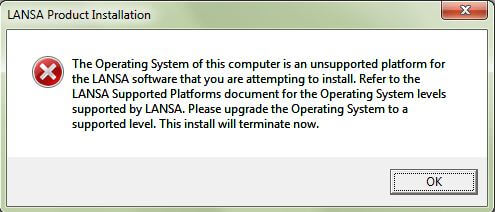 |
|
| 13 Dec 2012 | Visual LANSA | V13 GA | Category: Licensing V13 requires new licenses across all LANSA V13 products and features. You can prepare for V13 by sending in an upgrade license request in advance of installing V13. Refer to the License Planner in Product Licensing for details.. |
|
| 13 Dec 2012 | Visual LANSA | V13 GA | Category: Licensing Hardware Key upgrade request email issue. This situation existed in previous versions but may be encountered more by users because of the need to upgrade their Hardware key to V13. Some email Clients do not interact correctly with the Hardware Key License request email functionality. If you encounter email issues while sending the hardware key upgrade request to LANSA licensing, you can do either of the following to overcome the issue - Select the Print option and fax the details to your local LANSA representative - Select the Save All button. The request will be saved on your local hard drive. Note the location of the saved text file in the generated message. Add the text file to an email and send it to your local LANSA representative. |
|
| 13 Dec 2012 | Visual LANSA | V13 GA | Category: Development For development slave installations, you MUSTcheck in all objects currently checked out for update prior to upgrading to LANSA Version 13 to ensure the future integrity of updates. This is required due to changes implemented in LANSA Version 13 to ensure only a single developer is able to check out and make changes to repository objects. |
|
| 13 Dec 2012 | Visual LANSA | V13 GA | Category: Database V13 requires SQL Server 2008 R2 Express Edition at the latest service pack. If you do not have the latest service pack already applied to SQL Server 2008 Express, you can download it from Microsofts web site. Navigate to the download centre https://www.microsoft.com/en-us/download/default.aspx and search for SQL Server 2008. |
|
| 13 Dec 2012 | Visual LANSA | V13 GA | Category: Database You are only licensed to use the Microsoft SQL Server 2012 Express Edition database software installed by Visual LANSA in conjunction with a Visual LANSA development seat. You must not deploy an application that uses the Microsoft SQL Server 2012 Express Edition database software without a separate license from Microsoft. |
|
| 13 Dec 2012 | Visual LANSA | V13 GA | Category: Install When installing Visual LANSA network client installations, if performance of the IDE is sluggish, this can be caused your your anti-virus software. Adding the network path to the Exclusion list can cause the IDE to be much faster. |
|
| 13 Dec 2012 | Visual LANSA | V13 GA | Category:Deployment MSI Installs require Windows Installer version 4.0 or later. This may mean that it must be manually installed on Windows XP before deploying a V13 app. |
|
| 13 Dec 2012 | Visual LANSA | V13 GA | Category: Unicode RDMLX support of Unicode fields will not include DISPLAY, REQUEST and POP_UP commands. This means that V13 will only support Unicode fields for presentation in Web pages for WAMs only, not RDMLX *webevent functions. |
|
| 13 Dec 2012 | Visual LANSA | V13 GA | Category: Long Names RDMLX support of long names will not include fields and lists used on DISPLAY, REQUEST and POP_UP commands. This means that V13 will not support long names in *webevent pages for all fields and lists. |
|
| 13 Dec 2012 | Visual LANSA | V13 GA | Category: Install VL development supported on Windows 7 only, not XP or Vista. WAM development supports minimum IE8 (shipped with Windows 7). |
|
| 13 Dec 2012 | Visual LANSA | V13 GA | Category: Development All Visual LANSA EXE and DLLs are now digitally signed. This identifies the author of the objects as being published by LANSA, aids in identifying modification of the objects and also ensures cleaner usage of Sysinternals tools like ListDLLs v3.1 which adds a new option designed to aid in malware hunting that filters output to include only unsigned DLLs. |
|
| 13 Dec 2012 | Visual LANSA | V13 GA | Category: Unicode Reloading pre-V13 Other files that have Char/String fields with the SUNI attribute will not change the fields to Nchar/Nvarchar. Also, for these files, any new Unicode fields will be loaded as Char/String with SUNI* as per version 12. To get around this and load new and existing Unicode fields on a file as Nchar/Nvarchar, you need to remove all fields with SUNI from the file. Here's an example of how to do this:
|
|
| 13 Dec 2012 | Visual LANSA | V13 GA | Category: Development Override of File library on Windows requires OAMs to be re-built in 13.0 and for Functions and Components to be built with Visual LANSA 11.5 or later. |
|
| 13 Dec 2012 | Visual LANSA | V13 GA | Category: Development Many Visual LANSA components e.g. Forms (Prim_Form) and Tree View Item (Prim_TVIT), were originally designed to use only repository enrolled icons (Prim_ICON). However, with PNG (Portable Network Graphic) becoming the norm, it has been necessary to change the class of the Image and Icon properties for a number of different primitive classes to support Bitmaps (Prim_BMP) as well. For example, the icon property of Form (Prim_FORM) now inherits from base graphic (Prim_FLBX) and can use both repository enrolled Icons (Prim_ICON) and Bitmaps (Prim_BMP). Similarly, the ImageXxxxx properties found on Tree Item (Prim_TVIT) have also be changed. For most situations, this will be of little consequence. However, in scenarios where the icon is used programmatically and a specific class of image is expected, it is possible that the upgrade to v13 will result in syntax errors. To counter this issue, the user will need to change the target variable so that it too is defined as a base graphic (Prim_FLBX) or if this is not possible, cast the image to the appropriate class. |
|
| 13 Dec 2012 | V13 GA | Category: Version Control Systems Version Control System (VCS) Considerations Version Control removes the following features from LANSA:
|
||
| 13 Dec 2012 | LANSA for iSeries | V13 GA | Category: Unicode NChar support requires the ICU (International Components for Unicode) option on the iSeries® system. Install the ICU option by following these steps:
|
|
| 13 Dec 2012 | LANSA for iSeries | V13 GA | Category: Unicode Multilingual descriptors are now stored in UTF-8 in V13. |
|
| 13 Dec 2012 | LANSA Client | V13 GA | Category: Unicode Nchar fields are visible on LANSA Client, but are not supported. Customers using LANSA Client should not change existing fields to Nchar if they want to access those fields via LANSA Client. It is safe to add Nchar fields to existing files, but those fields will not be accessible via LANSA Client. |
|
| 13 Dec 2012 | LANSA Open | V13 GA | Category: Unicode Nchar fields are invisible to LANSA Open for now. Customers using LANSA Open should not change existing fields to Nchar if they want to access those fields via LANSA Open. It is safe to add Nchar fields to existing files, but those fields will not be accessible via LANSA Open. |
|
| 13 Dec 2012 | LANSA for iSeries | V13 GA | Category: Export/Import LANSA for iSeries Import now requires that duplicate Alternate Names be forced or not. When import is executed either via command LANSA IMPORT ... or call LANSA IMPORT, PARM10 positions 11-13 requires 'YES' for duplicate Alternate Names to be forced. The default is for Alternate Names to not be forced, in which case the existence in the importing partition of a duplicate Alternate Name for a different object to that being imported will cause the whole import not to proceed. |
|
| 13 Dec 2012 | LANSA for iSeries | V13 GA | Category: Export/Import LANSA for iSeries Import will now produce a second report - the Export Contents Report. Instead of showing the entire contents of the export, this will be produced to show any duplicate alternate names that are in the export, or that no duplicate alternate names have been found there. |
|
| 13 Dec 2012 | LANSA for iSeries | V13 GA | Category: Field Type LANSA files with Binary or Varbinary fields now use the native types Binary and Varbinary on IBM i. This is reflected in the OAM code, so if the OAM is rebuilt, the table must also be rebuilt, so the OAM and PFs/LFs have the same native field types. |
|
| 13 Dec 2012 | LANSA for the Web/WAMs | V13 GA | Category: Unicode WAM output is now in UTF-8.
|
|
| 13 Dec 2012 | LANSA for the Web/WAMs | V13 GA | Category: WAM Development Fields can now have different weblet visualizations for each TSP. The TSML document used to generate the TSP XSL stylesheets has changed to support this new feature. Look at the sample provided in the Technology Service Providers section in the WAM guide. You need to consider this change if:
|
|
| 13 Dec 2012 | LANSA for the Web/WAMs | V13 GA | Category: WAM Development JavaScript validation messages now support more languages (XHTML and jQMobile). They rely on the ISO language code to retrieve the language/locale version of the file (if found). Read the WAM Guide section 3.11 about localization. |
|
| 13 Dec 2012 | LANSA for the Web/WAMs | V13 GA | Category: WAM Development jQuery Core, jQuery UI and jQuery UI Timepicker libraries have been updated to versions 1.7.2, 1.8.2 and 1.0.1 respectively. LANSA has changed the images path to these third party library files. They are automatically used by WAMs as they are shipped as external resources. If you have WAM static pages, they will need to be recreated or manually updated. |
|
| 13 Dec 2012 | LANSA for the Web/WAMs | V13 GA | Category: WAM Development Web jobs will only log user profile changes when there is an actual user profile change. If the web request is for the current user profile, the job's user profile is not reset, but the environment is reset (library list and other user profile settings) as the previous request may have made changes to the environment. |
|
| 13 Dec 2012 | LANSA for the Web/WAMs | V13 GA | Category: WAM Development WAM development supports minimum IE8 (shipped with Windows 7) |
