Enabling Debugging for web in V14
| Date: | 31 March 2016 |
|---|---|
| Product/Release: | LANSA V14 |
| Abstract: | Steps to Enable web debugging in V14 |
| Submitted By: | LANSA Technical Support |
| Updated: | 18 May 2016 |
Visual LANSA Server Modules
In V14, by default, Server Modules are not enabled for debugging. If you try to debug your Web application, you will go from the call to the Server Module directly to the return from the Server Module.
There are easy steps to enable debugging of a Server Module via the Web Administrator, as follows:
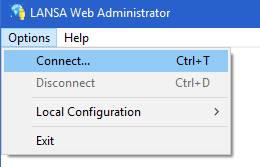
- Open the Web Administrator and select Options > Connect
-
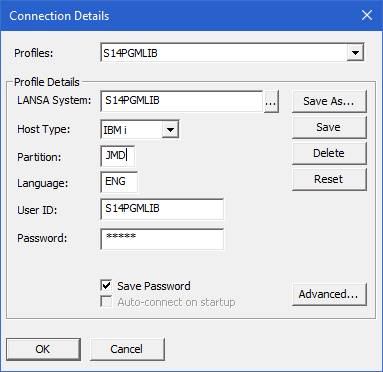
Connect to your LANSA System
-
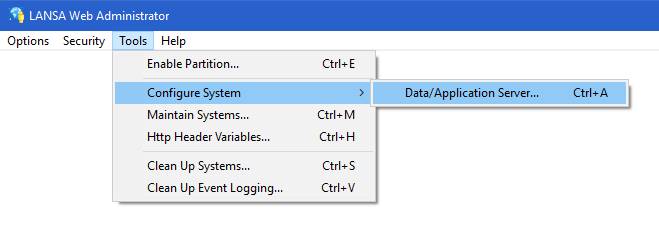
Once connected select Tools > Configure System > Data/Application
Server
-
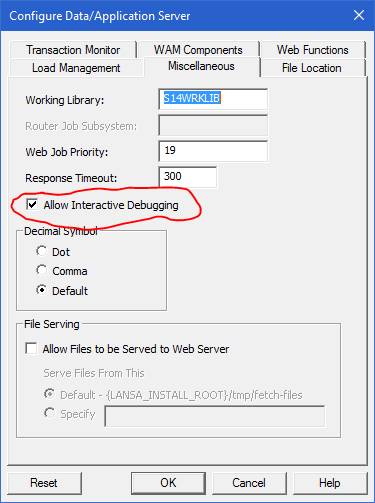
Now navigate to the Miscellaneous tab and
select Allow interactive Debugging.
- If you refresh the URL in the browser, the debugging change will be picked up immediately and you can begin debuging your Server Module.
Update: In V14, the Allow Interactive Debugging option was not interrogated for web pages and even with the option off (unchecked), a web page executed in debug mode would open the debugger and could be debugged. In V14 SP1, the Allow Interactive Debugging option will be honoured for web pages as well as Server Modules and executing a web page in debug mode with Allow Interactive Debugging off will issue a message on the browser "Interactive debugging is not active. Go to Web Administrator to activate."