Instructions for copying the LANSA for i save file to your IBM i.
| Date: | 18 May 2018 |
|---|---|
| Product/Release: | LANSA for i - V14 SP2 and above |
| Abstract: | Instructions for copying the LANSA save file to your IBM i in preparation for an install or upgrade. |
| Submitted By: | LANSA Technical Support |
| Updated: | 17 February 2021 |
From V14 SP2, the IBM i software is now provided as
a zipped save file, not as an ISO image.
On receipt of the LANSA for i save file from LANSA, it must be moved to your IBM i before using the LODRUN command to install LANSA for i.
This tip provides an example set of steps for copying the LANSA V14 SP2 save file to the IBM i in preparation for an install or upgrade. It is assumed that you already have the zip file with the LANSA for i save file on your local drive, for example C:\TEMP. The zip file is called LANSAPKG_142_SPIN0335.zip.
NOTE: The same instructions can be used for any version above V14 SP2. Simply replace the LANSAPKG_NNN_SPINXXX.ZIP, where NNN is the LANSA Version and XXX is the spin number.

3. Extract the save file from the zip file

Once extracted, a file of type SAVF will be available. This is the V14 SP2 LANSA for i save file.

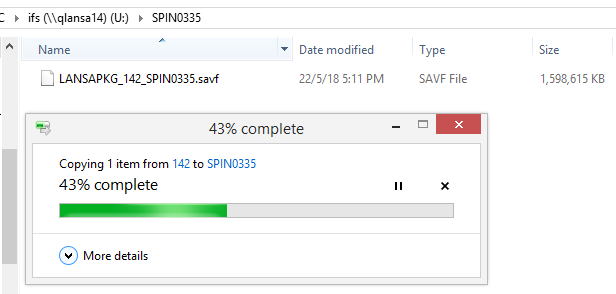
4. Using File Explorer, copy the IBM i save file to an IFS folder, either an existing folder on the IFS or a new one you will create for this file (You may require assistance from your network administrator if your IBM i IFS is not available in File Explorer or if you are not authorized to folders on the IFS).
5.
Now that you have the save file in a folder on the IFS, you must get it to a
library on the IBM i. You may have your own instructions for copying a file
from the IFS to a library. If not, you can follow the IBM link below for
instructions to FTP from the IFS to a save file in
QGPL. Its vital to create the save file in QGPL first. Note that save
file names have a limit of 10 characters. LANSA recommends the following
command CRTSAVF FILE(QGPL/LANSAPKG) TEXT('LANSA V14 SP2')
http://www-01.ibm.com/support/docview.wss?uid=nas8N1012624
6.
Finally, use the LANSA provided instructions to
install or upgrade LANSA.
V14 SP2 instructions:
install or
Upgrade LANSA
V15 instructions: Install or Upgrade LANSA on IBM i - Install or Upgrade LANSA